Short answer: a useful AI tattoo prompt names six things: the subject (with how many and what it is doing), the tattoo style, the placement, the real size, how the lines and shading should work, and what to leave out. Leave any of them out and the model fills the gap with a guess, usually a detailed illustration that looks good on screen and cannot be tattooed as drawn.
We build Tatany, an AI tattoo generator, so we read a lot of prompts and see what the model does with them. This guide explains the reasoning behind each part, shows what our generator adds on its own so you do not waste words on it, and ends with a checklist for the step that matters most: taking the result to a tattoo artist.
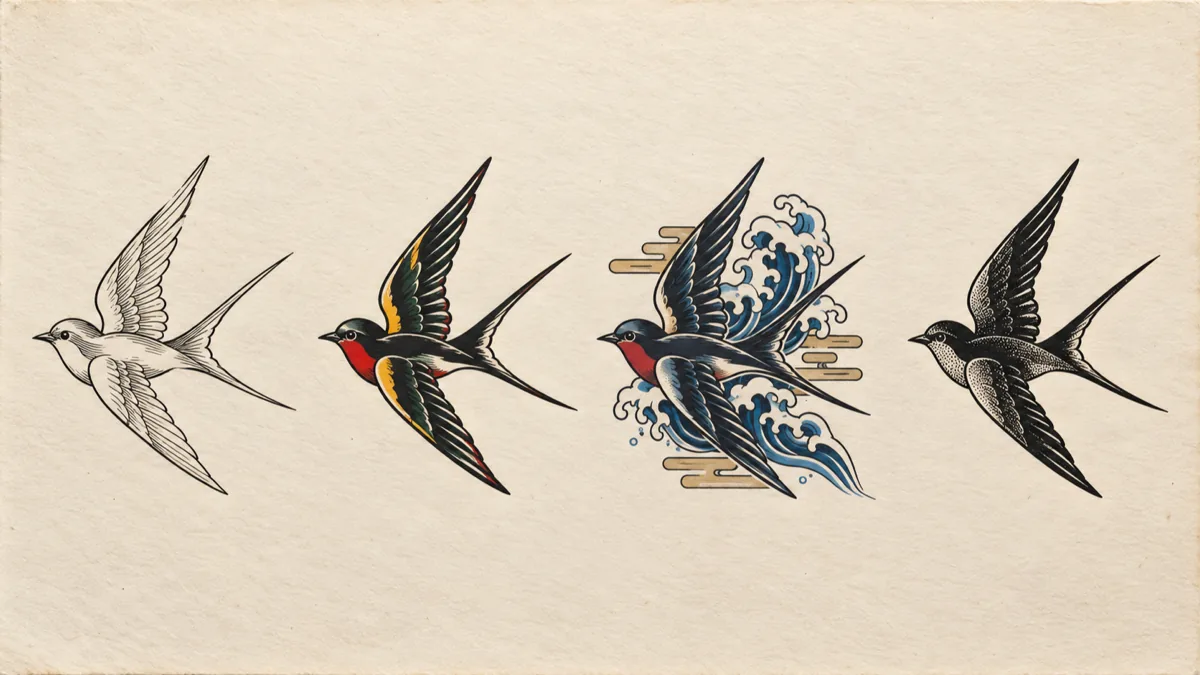
The same swallow in four styles. Changing one word in a prompt changes line weight, colour and composition. Illustration made for this article.
Why a picture prompt is not a tattoo prompt
An image model is trained to make pictures. A picture can have a sunset behind the subject, soft airbrushed gradients, glowing eyes, and a thousand hair-thin strokes, because a screen shows all of it perfectly. Skin does not. A tattoo is ink sitting in the dermis, on a curved surface that moves and stretches, and every line spreads a little as it heals and ages.
That gap is why a short prompt like "wolf tattoo" usually returns something closer to a poster than a design. The model has no idea whether you want a palm-sized piece on the wrist or a back panel, so it draws a complete scene and fills the frame with detail.
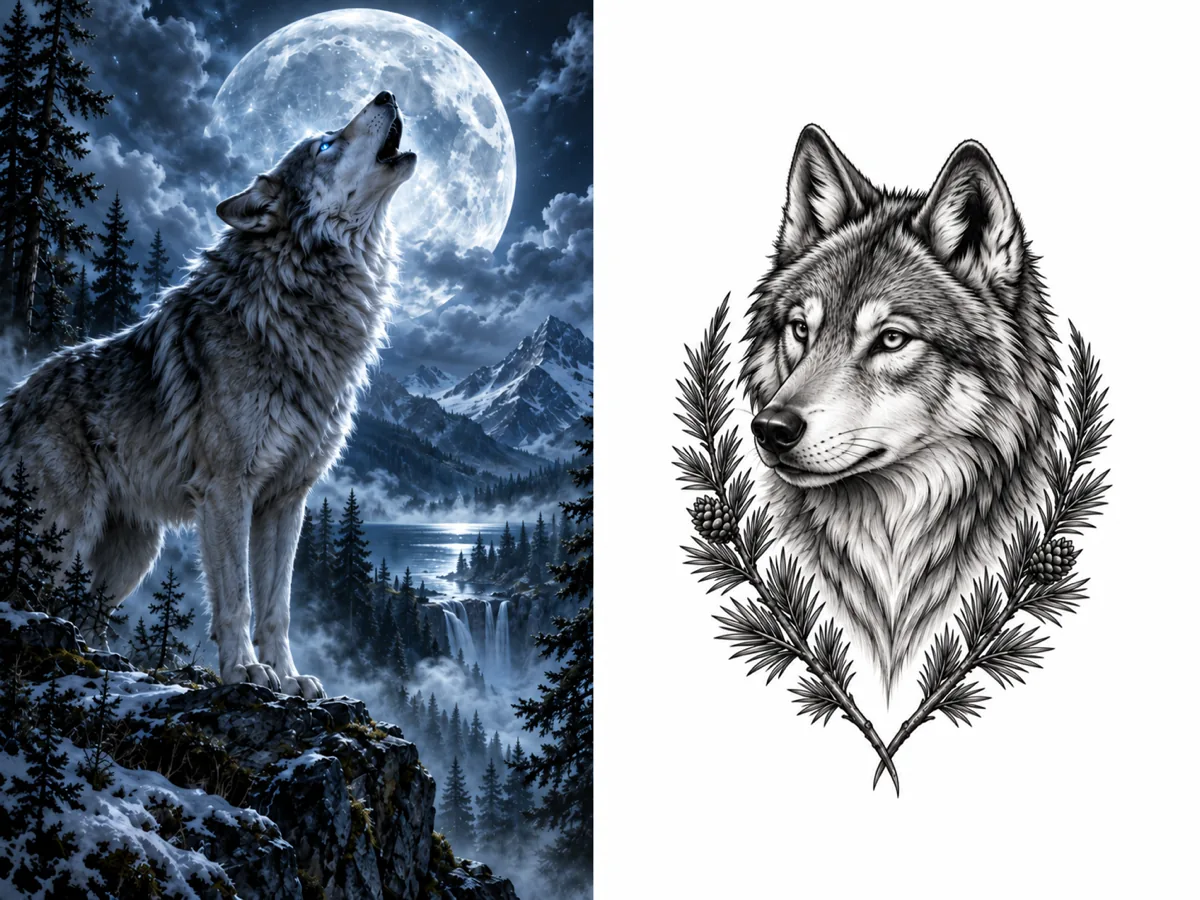
Left, the kind of result a vague request tends to produce. Right, what the same subject looks like when the prompt states style, framing, placement and background. Illustration made for this article.
Tattoo artists redraw almost every design a client brings in, AI or not. The goal of a good prompt is not a file you can tattoo directly. It is a concept clear enough that an artist can see what you want and redraw it with confidence. We cover that conversation in how to bring an AI tattoo design to your artist.
The six parts of a tattoo-ready prompt
| Part | Weak | Stronger |
|---|---|---|
| Subject | a wolf | a wolf head in three-quarter view, mouth closed, looking left |
| Style | cool style | black and grey realism |
| Placement | on my arm | vertical composition for the outer forearm |
| Size | small | about 15 cm tall |
| Line and shading | detailed | clean outline, smooth grey shading, no fine fur texture |
| Exclusions | (none) | no background scenery, no moon, no text |
1. Subject: count it, pose it, point it
Models are good at nouns and weak at quantities and relationships. "Flowers and a snake" can return three flowers or eleven, with the snake anywhere. Say how many of each thing, what the main subject is doing, and where the secondary elements sit relative to it: "one snake coiled around a single dagger, three small peonies at the base of the blade."
Direction matters more than people expect. If the design will sit on your left forearm and you want the animal to face your hand, say which way it faces. Artists often flip a design to suit a placement, but it is easier to agree on the intent from the start.
2. Style: one name, not a mood board
Tattoo styles are not just looks; they are working methods with their own line weights, shading techniques and ink choices. American traditional means thick black outlines and solid colour fills. Fine line means single-needle work and very little solid black. Blackwork means heavy solid black with open skin as the contrast. Asking for "fine line traditional realism" gives the model three conflicting instructions and it averages them.
Pick one style. If you are unsure, generate the same subject in two or three styles and compare, which is cheaper than describing a blend. Our AI tattoo generator has a style menu with twelve named styles, from Minimalist and Dotwork to Japanese, Blackwork and Watercolor.
3. Placement: the shape of the body is the shape of the design
A forearm is a long vertical panel. A chest piece is wide. A shoulder cap is round. A design composed for the wrong shape has to be squeezed or cropped later. Name the body part and the orientation: "vertical, for the inner forearm", "wide and symmetrical, across the upper chest", "circular, wrapping the shoulder cap".
4. Size: the detail budget
Size is the instruction people skip most, and it decides more than anything else whether a concept can work. A design 5 cm tall simply cannot hold what a design 20 cm tall can, because lines need space between them to stay apart as the tattoo ages. If you want a small tattoo, ask for less: fewer elements, fewer lines, more open skin.
A practical way to write it: give the approximate height in centimetres or inches, then match the complexity to it. "About 6 cm tall, simple, a few clean lines" is a coherent request. "About 6 cm tall, highly detailed with fine fur and a landscape" is not, and no model or artist can make it hold up. Our guide to why fine line tattoos blur explains the biology and gives sizing rules of thumb.
5. Line and shading: say what the needle should do
Words like "detailed" or "realistic" push the model toward photographic rendering. Better words describe tattoo techniques: "bold outline", "clean single-weight linework", "whip shading", "stippled shading", "solid black fills", "smooth black and grey gradients". These map onto things an artist can actually do with a machine and give the model a vocabulary that looks like ink rather than paint.
6. Exclusions: close the doors the model likes to open
Models add things: a background, a frame, a moon behind every wolf, a banner with invented text. State what you do not want: "no background, no frame, no text, no extra animals". Exclusions are cheap and they remove most of the clean-up work.
What our generator already adds, so you can skip it
Every tool turns your words into a longer instruction for the image model. In Tatany's generator, a few things are handled for you, which matters because the prompt box holds 500 characters:
- Style direction. Choosing a style from the menu adds a description of that style's technique, such as black ink only with intentional negative space for Blackwork, or separated dots instead of grey gradients for Dotwork. You do not need to explain the style in the prompt, only the subject-specific choices.
- Canvas shape from placement. Picking a body part sets the canvas shape: wide for chest and band designs, square for shoulder and hand, tall for most others.
- Complexity. Simple, Medium and Complex change how much interior detail the model is asked to include. Simple asks it to keep open gaps between features, which suits small pieces.
- Clean output. Results are asked for on a plain white background with no frame, mockup or watermark, and the design is composed to fill the canvas.
- Lettering only on request. The model is told not to add words unless you ask. If you want text, put the exact words in the separate text field (up to 80 characters) and pick a font there; the generator is told to keep your spelling and punctuation exactly.
That leaves the prompt free for what only you know: the subject, its pose, how the elements relate, the placement intent and the size.
A worked prompt, from vague to usable
Here is how one idea develops. Each step adds a part from the list above.
- Start: "wolf tattoo." Too open: the model chooses style, scene and size for you.
- Add subject, style and placement: "Black and grey wolf head in three-quarter view, mouth closed, looking left, vertical composition for the outer forearm."
- Add size, line logic and exclusions: "Black and grey wolf head in three-quarter view, mouth closed, looking left, framed by two pine branches below. Vertical composition for the outer forearm, about 15 cm tall. Clean defined outline, smooth grey shading, fur suggested with a few strokes rather than texture. No moon, no background, no text."
The third version is about 290 characters, well under the limit, and answers every question an artist would ask before redrawing it.
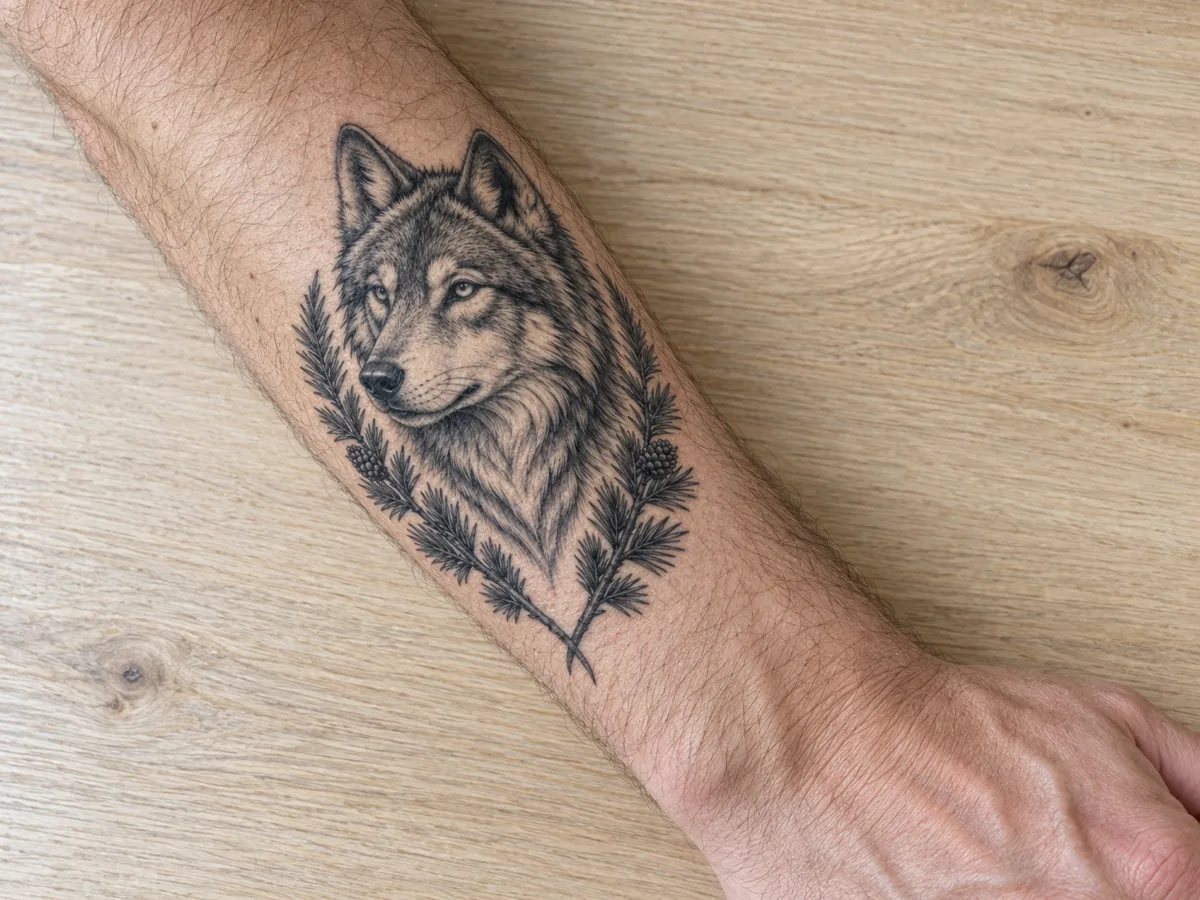
The wolf concept shown as a forearm piece. Seeing a design at body scale exposes problems a flat image hides. Illustration made for this article.
When a picture beats a prompt
Some things are faster to show than to describe: the pose of your own dog, the outline of a mountain you climbed, a sketch you already made. In those cases upload the image instead. Tatany's image to tattoo tool restyles a photo or drawing into a chosen tattoo style and is told to keep the subject's pose, silhouette and facing direction rather than invent a new composition. The generator also accepts a reference image alongside a written prompt when you want to keep a subject but change what is around it.
For lettering, the tattoo font generator shows the same words in many lettering styles side by side, which is the quickest way to choose a script before involving an artist.
Common mistakes
- Asking for a photo. "Photorealistic" and "8K" describe camera images. For realism tattoos, ask for "black and grey realism tattoo" instead.
- Stacking styles. Two styles at most, and only when one is clearly the base, such as "blackwork with a few dotwork gradients".
- Writing a story. The model cannot draw meaning. Translate the meaning into visible things: "my grandmother's garden" becomes "three sweet peas and a trowel".
- Ignoring size until the appointment. If the artist has to shrink a concept by half, most of its detail disappears. Decide the size first.
- Trusting generated text. Even with the text field, check every letter at full size before you go anywhere near a stencil.
Before you take it to an artist
Bring the concept as a reference, not as a finished file, and bring the information around it:
- The final image plus one or two runner-up versions, so the artist sees what you were choosing between.
- The placement and a photo of that area of your body.
- The size you want, measured on your body with a tape measure.
- Whether you want colour or black and grey.
- What you like most about the concept and what you are unsure about.
Then let the artist redraw it. They know how lines on your skin will heal, how the design should bend with the muscle, and how much detail the size can carry. A good prompt gets you to that conversation faster; it does not replace it.
Want to try it? Write a prompt with all six parts in the AI tattoo generator. A free account includes welcome credits and one free standard generation a day while signed in.